 X-Shop Education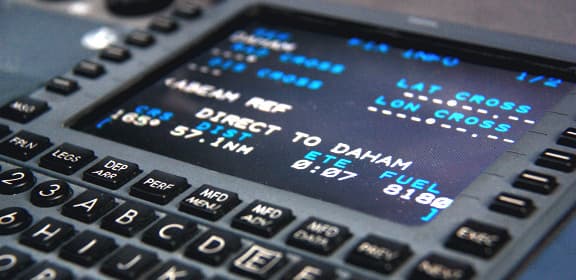
📍 How to create a flight route: from SimBrief to FMC
Here we will tell you in detail about drawing up a flight plan!
🚀 Introduction
Hello pilot! Do you want to fly like a pro? Then forget about “just took off and flew.” Real virtual pilots plan every flight, and now I'll show you how 😎Why plan at all?
💰 Save fuel (yes, even virtual!)
⏱️ You know the exact flight time
✈️ You fly realistically, like real airlines
🎯 They won’t let you into VATSIM without a plan at all
🌐 Step 1: Getting to know SimBriefWhat is it?
Free service for flight planning. Just a bomb! 🔥Register:
Go to simbrief.com
Create an account (2 minutes)
Setting up a profile
First flight plan:📍 Selecting airports
From: UUEE (Sheremetyevo, Moscow)
To: OMDB (Dubai)
✈️ Choose a plane
We are looking for a Boeing 777-200ER (if you have a FlightFactor 777)
SimBrief knows all the characteristics!
🛣️ Route
Click "Generate Flight"
SimBrief itself will offer several options
Watch the time and fuel
💡 Advice: Choose “Company Route” if available - these are the routes of real airlines!📊 What SimBrief will show you: Basic information:
⏱️ Flight time: ~5 hours 20 minutes
⛽ Fuel: 52.4 tons
📏 Distance: 2,436 nautical miles
🌡️ Winds aloft (winds at height)
Cool features:
📄 PDF with full briefing
💾 Files for uploading to FMC (.fms, .fmc)
🗺️ Route map
📝 Weather on departure and landing
🌦️ Checking the weather and NOTAMWhere to watch:
https://metar-taf.com/
📱 SimBrief (there is already weather there)
💻 In X-Plane itself
What to check:
☁️ Cloudiness on departure and landing
💨 Wind (choose the right runway!)
🌧️Precipitation
👁️ Visibility
NOTAM is important!
The runway or zone may be closed - it’s better to know in advance 😅⛽ Step 4: Setting up the fuel. Look in SimBrief:
🛢️ Trip Fuel: main fuel for the route
🚕 Taxi: for taxiing (usually 0.5-1t)
🎯 Alternate: to the alternate airfield
🆘 Reserve: emergency reserve (NEVER touch!)
In FMC we enter:
INIT REF → FUEL
ZFW: 185.0 (weight without fuel)
FUEL: 52.4 (fuel in tons)🎯 Step 5: V-speeds and takeoff
We calculate the speeds:
V1 - decision speed
VR - nose lift speed
V2 - secure dialing speed
💡 SimBrief counts them automatically! Look in PDF. Enter in FMC:
TAKEOFF REF
V1: 152
VR: 160
V2: 165✨ Case Study: UUEE → OMDB1. Go to SimBrief
From: UUEE, To: OMDB
Aircraft: B777-200ER
Generate ✅
2. Analyze
⏱️ Time: 5:20
⛽ Fuel: 52.4t
🛫 SID: VALO7B
🛬 STAR: LOVOL1B
3. Download
📄 OFP (briefing)
💾 FMS file
4. In X-Plane
Loading the route
Introducing fuel
Programming FMC
Ready to fly! 🚀
📚 Useful resources
🌐 SimBrief - the main tool
📖 FlightAware - real routes
🗺️ SkyVector - airway maps
📊 Charts - airport maps for free
🎓 Briefly:
✅ Register in SimBrief
✅ Planning a flight
✅ Upload to FMC
✅ Checking the weather
✅ We count fuel
✅ We fly like a pro! 🛫