 X-Shop Education
Putting together the perfect setup for X-Plane 12 in 2026
We select plugins, planes and utilities that will turn X-Plane 12 into the perfect simulator - from visual improvements and camera to performance and navigation
X-Plane 12 is already impressive out of the box: updated flight physics, a modern weather system and new rendering. But anyone who has spent more than a couple of evenings in the simulator knows that the real potential is revealed through addons.
Properly selected plugins and scripts turn X-Plane from “just a simulator” into a personal tool tailored to your tasks. In this article we are putting together a setup that will cover all key aspects - from visuals to performance.
Camera
X-Plane's standard camera system is one of the simulator's weakest points. X-Camera completely fixes this.
The plugin allows you to create and save cameras at any point - a view of the wingtip during approach, a close-up of the dashboard, an angle on the overhead panel. Switching between types is smooth, without jerks. Settings are saved for each aircraft separately: switched from a Boeing 737 to a Cessna 172 - all your views are in place.
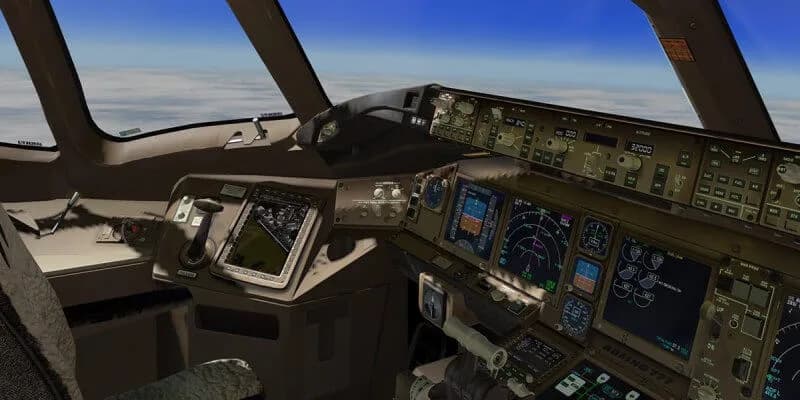
X-Camera is especially useful with detailed addons from FlightFactor and ToLiss. You can configure separate cameras for each stage of the flight - FMS for route programming, overhead for starting engines, instrument panel for approach.
For extra immersion - XPRealistic. The plugin adds shaking when taxiing, vibrations from turbulence and g-force effects on the camera. In combination with the X-Camera, the feeling of flying is completely different.
Airplanes
No plugins can replace a good airplane. Here are three models that will form the basis of the fleet for 2026.
FlightFactor Boeing 777 v2 is the main long-haul aircraft for X-Plane. The updated version received redesigned graphics, improved systems and a more detailed cockpit. Realistic engine model, full three-axis control system and VR support.
ToLiss A321 is the best choice for medium-haul flights. Excellent design of Airbus systems, compatibility with most plugins - RealOps for ground handling, announcement system in the cockpit via FlyWithLua. Works stably under X-Plane 12.
Ground handling
The flight begins not with a take-off run, but with preparation at the gate. Realistic ground handling adds a whole layer of immersion that many people underestimate.
RealOps - plugin for ground services: gangways, tankers, luggage carts, catering. For popular aircraft - FlightFactor 777, ToLiss A321, BAe-146 - the community creates ready-made profiles. Just put the file in the plugin folder.
X-ATC Chatter adds background radio conversations from dispatchers and other aircraft. This is not a full-fledged ATC, but rather atmospheric sound - broadcasting, negotiations, calls. When taxiing through a large hub, the difference is enormous: the airport no longer feels empty.
WorldTraffic 3generates AI traffic with realistic routes and schedules. Empty airports are the main scourge of any simulator, and WorldTraffic solves this: planes of other airlines land, taxi, stand at the gates and take off.
Performance
Beauty is useless at 15 FPS. Several tools will help keep your frame rate normal.
FlyWithLua - a framework for running Lua scripts. FPS itself does not improve, but SimReaperXP works through it - a utility that specifically disables the most “heavy” effects: shadows in the cockpit, cloud shadow rendering, water effects. Settings can be changed directly in flight via the menu.
Airport Optimiser Removes animated vehicles at airports - the main hidden FPS killer. According to tests, the increase is 3-4 frames at busy airports and a more stable frame rate without sudden drops.
If you have a lot of addons, xOrganizer - a manager for scripts, plugins and scripts - will help. Enable and disable add-ons without manually moving files - convenient for testing and finding conflicts.
Navigation and planning
Preparing for a flight is a special pleasure if you have the right tools.
SimBrief is a free online service that generates realistic OFP (Operational Flight Plan) with fuel, route and load calculations. Most modern addons can import data from SimBrief directly into FMC - no need to enter the route manually.
Navigraph - subscription to current navigation data (AIRAC). If you fly according to real procedures - SID, STAR, instrument approaches - up-to-date data is necessary. Navigraph also offers Charts - electronic maps of airports and procedures that are convenient to keep open on a second monitor.
Total
Putting everything together, the recommended basic set looks like this: ITC Light Mod and xa-snow for visuals, X-Camera and XPRealistic for camera, FlightFactor 777 v2, ToLiss A321 as main fleet, WorldTraffic 3 for ground, X-ATC Chatter for atmosphere, FlyWithLua with SimReaperXP and Airport Optimiser for performance, SimBrief and Navigraph for navigation, xOrganizer for addon management.
This is not the only possible configuration - each pilot has his own priorities. But this set covers all the basics and has been tested by thousands of hours of flight time in the community.
Most of the addons from the list are available in the X-Shop catalog - aviashop.online.